

Blog - no.16: White Balance – The Setting That is Often Overlooked in Photography
Have you ever taken a photo of a scene that looked perfect when seen through your eyes… but your camera decided the world should be orange, blue, or just a little “off”? That’s usually a white balance issue.
White balance is one of those settings that every photographer has heard of, but many forget to adjust regularly (especially when the light changes quickly). Whether you’re a complete beginner or a seasoned pro, keeping an eye on white balance can mean the difference between a natural-looking shot and a “Why is everything so yellow?” moment.
Let’s break down why white balance matters, why it’s so often neglected, and how you can use it to make your photos look more true-to-life, and sometimes more creatively expressive.
What is White Balance, Really?
Every light source has a color temperature. Daylight tends to be neutral, household lamps are warm and yellow/orange, and areas of shade can be cool and blue. Your camera tries to guess what “white” should look like under each type of light, this is what white balance is for. Many of us photographers love the soft warm tones of golden hour, as well as blue hour. But these are two very different lighting conditions that effect how the colour white will look in a picture.
When the camera gets it right, whites look white, and colours look the way your eyes expect them to.
When it gets it wrong… well, you’ve probably seen those results.
We measure White Balance using something called the ‘Kelvin’ scale (K), and depending on your camera model, you will have various ways of setting this in your camera.
Our eyes naturally adjust depending on our environment, but cameras cannot adapt in the same way to colour variations. That’s why a sheet of paper viewed through our eyes appears white to us irrespective of whether it’s under daylight or candlelight.
Many photographers will stick their camera setting to ‘AWB’ (Auto White Balance) and simply let the camera decide the value for them. In many scenarios, this is perfectly fine but move into the realms of natural light at sunrise and sunset, candlelight, or even from room to room in a house, then your camera will struggle to give you a true representation of white using the auto setting.
Many cameras will have a typical ‘Auto White Balance’ range between 3000K to 7000K. When in AWB, your camera will operate within this range and set the white balance accordingly to what it thinks is best.
But lets say for example that the scene you are shooting falls outside of this range, then your camera will be unable to match the correct white balance setting. Many cameras will actually let you manually set the white balance as low as 2000K and as high as 10000K.
But for convenience, most cameras will also have some preset options that you can choose for the type of scene you are in. For example:
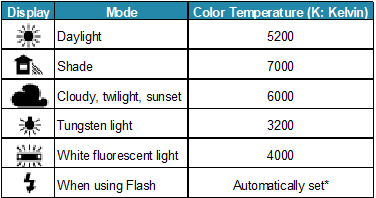
Examples of White Balance Presets
These are obviously much quicker and easier to use, but also much easier to forget to change!
So, the lower the Kelvin number, the more red/orange and warmer the light is, and the higher the Kelvin number, the more blue and cooler the light is.
A good tip: If your camera has programmable buttons, it is a good idea to set one of them to quickly open your cameras ‘White Balance’ options, which is much quicker than trying to go through your camera’s menu to find them each time.
Why White Balance is So Important
1. It Affects the Entire Mood of a Photo
Warm tones feel cozy, nostalgic, or intimate. Cool tones feel calm, clean, or dramatic. By setting white balance intentionally, you’re controlling the emotional feel of the image, not just the accuracy.
2. It Helps Prevent Hours of Editing
Yes, RAW files let you fix white balance in post, but accurately adjusting mixed lighting or extreme color casts later, can be a headache. Getting it right in-camera saves time and will give you better results.
3. It Impacts Skin Tones
Portrait photographers will know all too well: the wrong white balance can turn your subject into either a carrot or a Smurf. Neither of which are very flattering nor ideal!
Why Photographers Keep Forgetting to Change it
You’re not alone, nearly everyone does this. Here are the most common reasons:
1. Auto White Balance (AWB) Seems “Good Enough”
And honestly, sometimes it is. But AWB can shift unpredictably from frame to frame, especially when colours or lighting vary. We often take the easy route and having a process with the word ‘Auto’ in it makes for an easier life. And as creatures of habit we sometimes just like to leave the setting on auto.
2. Lighting Changes Faster Than we Think
If you are moving from indoors to outdoors, stepping from harsh sunlight into the shade, or perhaps just moving between rooms within a house, your white balance often needs updating. But it’s very easy to forget in the excitement of shooting. So, to reiterate my earlier point, this can easily become embedded into muscle memory, and taking the time to assign a programmable button on your camera can make this much easier to change.
3. It’s Not as Eye-Catching as Aperture or Shutter Speed
White balance isn’t glamorous. It doesn’t blur backgrounds or freeze motion. But it does make your images look polished and professional. Many photographers get tunnel vision and concentrate on the exposure triangle, and then totally forget about the white balance settings. But as you get more experienced with photography, you should be aware of your white balance settings in the same way you are of your aperture, shutter speed, and ISO.
How to Use White Balance Intentionally
1. Try Using Your Camera’s Presets First
Daylight, Cloudy, Shade, Tungsten, Fluorescent… these presets exist for a reason, and they’re surprisingly accurate, and much easier to use as these cover most normal scenarios and are quick to select in camera.
2. Adjust Your Kelvin Setting (if Your Camera Allows it)
More control = more consistency.
Lower Kelvin (3000–4500K) = cooler
Higher Kelvin (5500–7500K) = warmer
Get your camera out now and have a play. Find out how to change your white balance value in your cameras settings and remember how to change it quickly. ‘What white balance do I need’, should be one of the first questions you ask yourself every time you pick up the camera, just like is there anything moving in the frame, and therefore, is shutter speed a priority.
3. Consider Using a Grey Card for Perfect Accuracy
Especially useful for product photography, portraits, or any professional work, where getting the colours accurate is vital. Getting a consistent result each time you take a photo is key, especially if you are taking a series of pictures of similar coloured objects, as you will want them to all look the same colour post editing.
4. Break the Rules for Creativity
Rules are made for breaking, and sometimes you may want to simply experiment and warm up sunsets for drama or cool down a nighttime city scene for atmosphere. White balance doesn’t always have to be “correct”; it just has to be intentional.
What the Differences Look Like
To help you visualise what white balance does, I’ve included some images showing the same scene under the following preset white balance settings, as well as ‘Auto White Balance’ (letting the camera decide the value), and a custom White Balance setting (where I have used a grey card to get a true white balance value for the scene):
Tungsten (very cool – 3200K)
White Fluorescent (cool – 4000K)
Auto White Balance (letting the camera decide)
Custom White Balance (set using a grey card)
Daylight (neutral – 5200K)
Cloudy (warm – 6000K)
Shade (very warm – 7000K)
Try not to just focus on the background in each of the images, but look at the colour of the green in the tree and the brown cloth in the image. Remember, white balance is all about making the colours of our subject as close to reality as possible…

Tungsten (very cool – 3200K)

White Fluorescent (cool – 4000K)
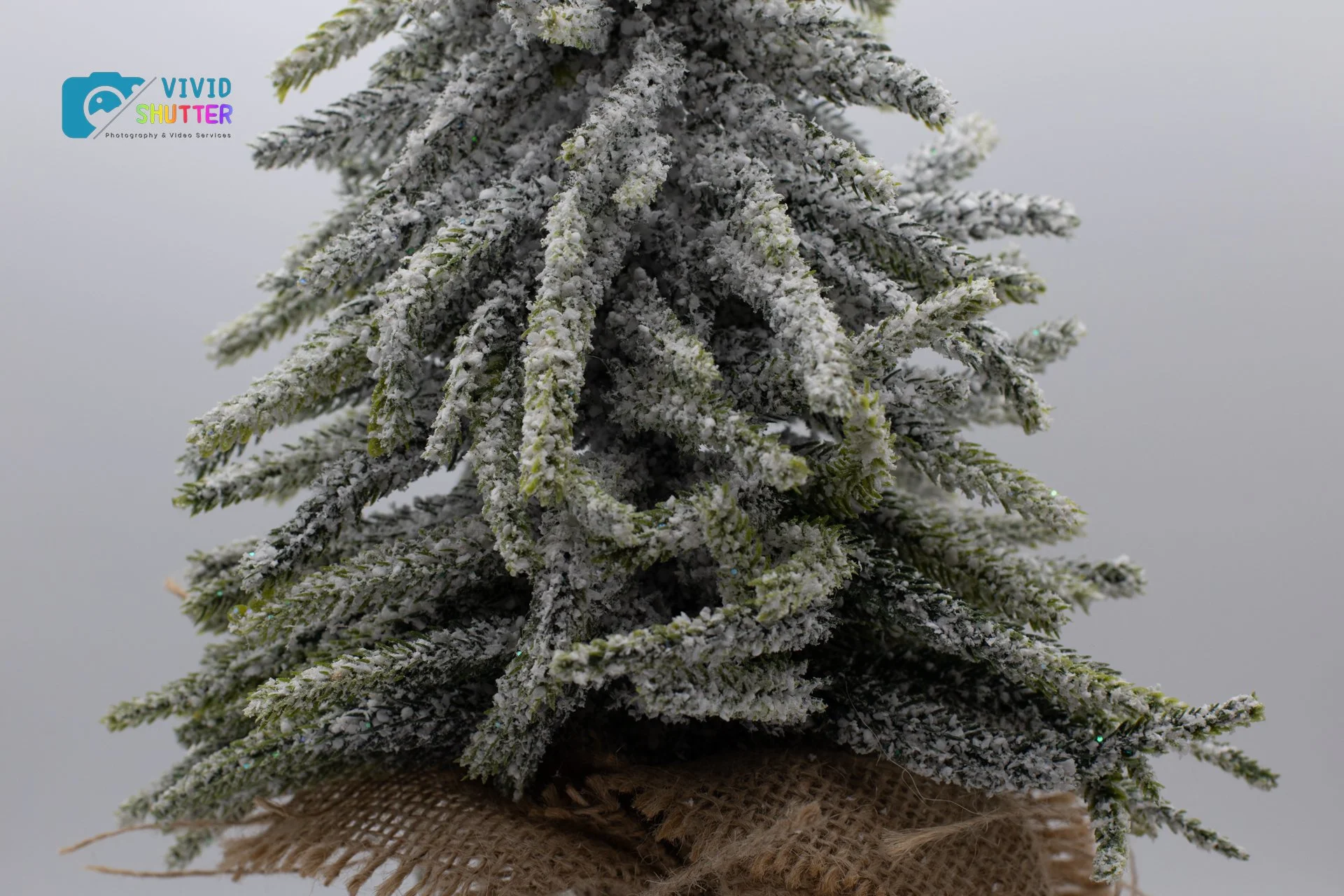
Auto White Balance (letting the camera decide)

Custom White Balance (set using a grey card)
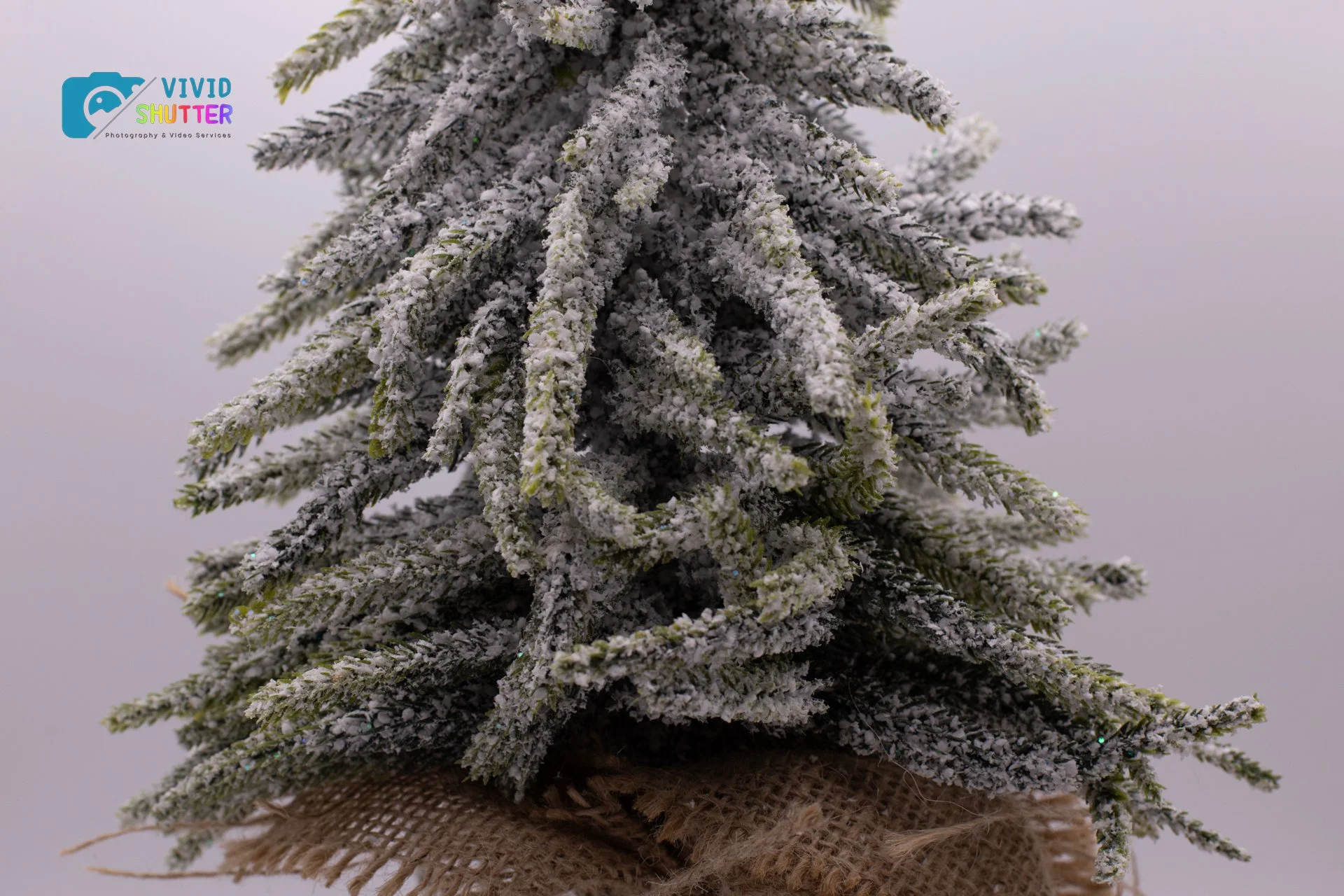
Daylight (neutral – 5200K)

Cloudy (warm – 6000K)
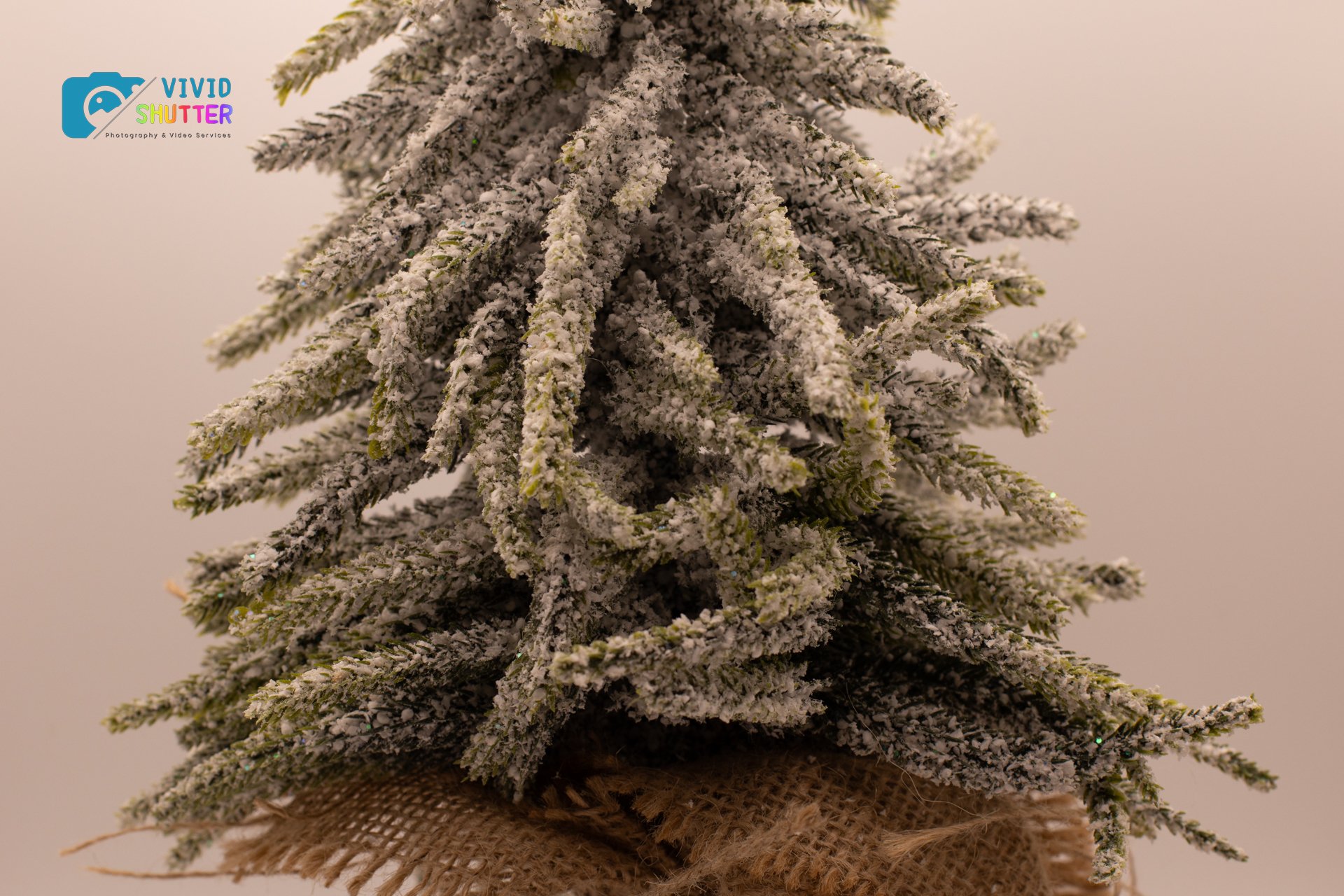
Shade (very warm – 7000K)
So hopefully from this very basic indoor lit scene, you can see that white balance value makes a big variance on the outcome of a photo. Even the ‘Auto White Balance’ setting is a little off from the calibrated custom white balance that you get when using a grey card. And getting this right, is key to photographing a true reflection of the actual colours seen by our eyes.
Until next week - That’s me signing off….
